










How does Image Optimization Impact Website Loading Speed?
We talk a lot about performance in the digital world, but most of that conversation focuses on servers, hosting, and code. The truth is that the biggest weight on most websites is not the server or the script. It is the images. They are heavy, they are everywhere, and they often load before anything else. When a site slows down, images are usually the first place we look. That is why image optimization techniques have become a core part of Website performance strategy rather than a small technical task.
At Nucleo Analytics, we have seen sites struggle with bounce rates, low conversions, and weak engagement, only to discover the issue was never the content or the design. It was the weight of the visuals. Modern users expect pages to load immediately. They do not tolerate friction. They do not wait for heavy files to finish rendering. That is what makes image optimization so crucial. It is not just a developer task. It is a marketing task, a UX task, and a business task.
Why Image Optimization Matters More Than Ever
If a page takes longer than three seconds to load, a significant percentage of users leave before interacting with anything. That is how sensitive users are to delays. Images affect every part of that experience. They shape the layout, the visual hierarchy, and the way the page feels. But without optimization, they also slow down everything else on the page.
Search engines know this. They factor load speed into ranking signals. A heavy site ranks poorly even if the content is excellent. A fast site gets rewarded. This puts businesses in a position where ignoring image performance is no longer an option.
Understanding What Slows Websites Down
A slow website is not a mystery. It comes from predictable patterns. When we run audits at Nucleo Analytics, we usually find the same issues repeated across industries.
Large File Sizes
Images and graphics often ship at full resolution. A photo uploaded at 4000 pixels wide might be displayed at only 800 pixels on the screen. The excess data serves no purpose, yet it must load. This becomes one of the biggest contributors to lag.
Incorrect File Formats
Using PNG for photographs or JPG for illustrations creates unnecessary weight. Without format awareness, the page ends up carrying more than it needs.
Lack of Compression
Uncompressed visuals slow everything. This is where options like compressing images online become valuable, because compression does not just shrink file size. It reduces the time spent transferring data across networks.
Delayed Loading Without Prioritization
Not all images need to load immediately. When everything loads at once, the browser struggles. This is where optimization techniques like lazy loading change the experience.
Render Blocking
Sometimes images load before the CSS or layout structure, forcing the browser to pause. That pause is visible to users, and it breaks the flow.
These issues are avoidable. With the right process, image optimization becomes a natural part of development rather than a last-minute fix.
The Real Impact of Image Optimization on Load Time
We often try to explain this with numbers, but the truth is simple. A lighter site loads faster. A faster site feels better. A better feel leads to stronger engagement. But the way image optimization influences speed is more layered than that.
Reduced Data Transfer
When users download fewer megabytes, pages load quickly. Every kilobyte removed improves load time. Compression and resizing directly reduce data.
Faster Rendering
Browsers interpret lightweight images faster. They draw visual elements in the correct order. The page stabilizes quickly, reducing layout shifts.
Better Mobile Performance
Mobile networks vary in speed. Heavy images punish mobile users. Optimized visuals make the experience consistent across all devices.
Improved Server Efficiency
When images are optimized, servers deliver smaller files. This reduces stress and increases the number of users the server can handle at once.
Better SEO Signals
Speed influences rankings. Faster load times often correlate with better visibility. Search engines reward sites that respect user experience.
How AI Is Changing Image Optimization
Image optimization used to be a fully manual process. Designers resized visuals, exported different formats, and checked file weights one by one. AI changes this. It automates detection, format selection, and compression in ways humans cannot match for scale.
Automated Format Decisions
AI knows when a file should be WebP, AVIF, JPG, or PNG. It looks at the content type and selects the format that provides sharpness at the smallest size.
Smart Compression
Compression is used to mitigate risk quality loss. AI can identify where details matter and where they do not. This results in crisp images with smaller file sizes. This is especially powerful for teams using tools to compress images online at scale.
Resizing Without Guesswork
AI recognizes the display size of an image and generates multiple size versions automatically. Browsers pick the correct version, and load time improves dramatically.
Detecting Render Blocking Behaviors
AI identifies images that interrupt layout flow. These are marked for deferred loading to avoid blocking the initial paint.
Quality Control
AI analyzes sharpness, contrast, and colour balance to ensure optimization does not degrade the visual experience.
Want AI-powered insghts that improve performance and boost engagement?
Understanding Modern Image Formats
The choice of format is one of the most important parts of image optimization. Each has strengths and weaknesses. Choosing the wrong one adds weight without adding value. Choosing the right one improves clarity, reduces load time, and helps the browser work more efficiently.
JPG
Best for photographs and gradients. Balances quality and size well. JPG works especially well on hero banners, lifestyle images, and product photos where smooth colour blending matters. It compresses aggressively while still looking visually clean, making it one of the most widely used formats across the web.
PNG
Used when transparency matters. Heavy but crisp. PNG works best for interface elements, diagrams, and visuals that rely on sharp edges. It holds detail well and keeps backgrounds transparent, which helps designers layer graphics without quality loss. The downside is weight, especially on pages that rely on multiple icons or decorative assets.
SVG
Vector graphics are ideal for logos, icons, and illustrations. SVG files scale without losing sharpness, which makes them perfect for responsive designs. They remain lightweight even at large sizes because they are code-based rather than pixel-based. When design consistency matters across screen sizes, SVG becomes the most reliable option.
WebP
A modern format that compresses well at high quality. Supported by most modern browsers. WebP produces images significantly smaller than JPG or PNG, making it one of the most efficient formats available. It handles both transparency and complex scenes, which helps teams replace multiple formats with one universal option.
AVIF
Excellent compression and quality. Smaller than WebP, ideal for high-performance sites. AVIF is newer but already proving its value. It supports deep colour, HDR, and superior compression ratios. It works especially well for visually rich pages where quality must remain high even with aggressive optimization.
The shift toward WebP and AVIF is one of the biggest optimization trends. These formats alone can reduce page weight by significant margins. Many teams at Nucleo Analytics adopt them early in the process to avoid retrofitting later. When modern formats combine with strong optimization practices, the overall performance gains become difficult to ignore.
How Website Builders Handle Images Differently
Not all websites handle images the same way. On some platforms, image optimization is built in. On others, everything must be done manually.
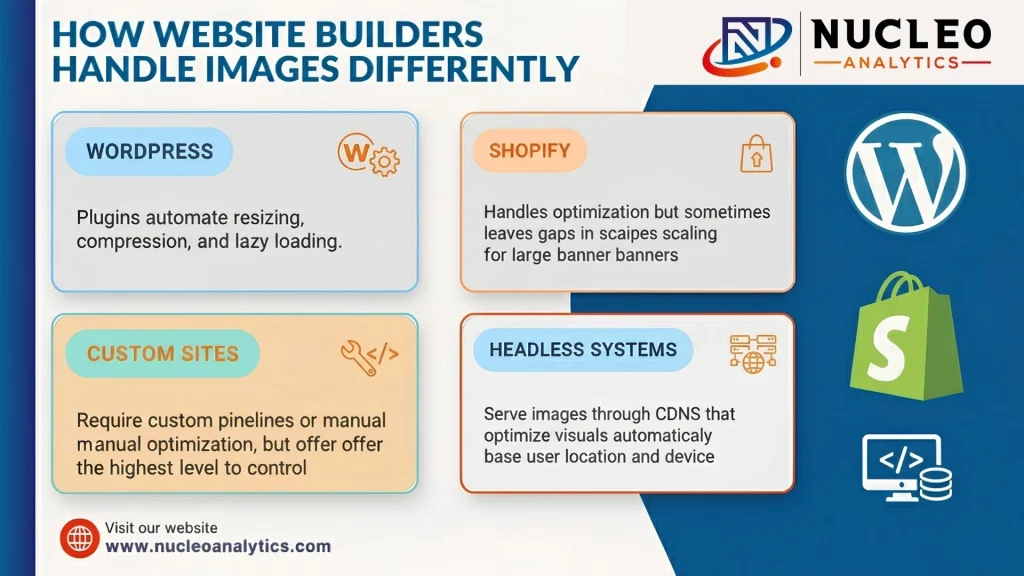
WordPress
Plugins automate resizing, compression, and lazy loading.
Shopify
Handles optimization but sometimes leaves gaps in scaling for large banners.
Custom Sites
Require custom pipelines or manual optimization, but offer the highest level of control.
Headless Systems
Serve images through CDNs that optimize visuals automatically based on user location and device.
Understanding the platform helps teams build a realistic optimization workflow.
Why Lazy Loading Matters More Than People Realize
Lazy loading delays images until they enter the viewport. This single technique has an immediate impact on load time.
Faster Initial Paint
Only the essential visuals load first. Users see the core layout instantly.
Reduced Initial Load Weight
Heavy images do not block other assets.
Better Mobile Experience
Mobile users scroll differently, and lazy loading ensures they only load what they actually view.
Reduced Server Load
Images load gradually rather than all at once.
Image CDNs and the Rise of Automated Delivery
Content Delivery Networks built specifically for images have become a major part of performance optimization.
Region-Based Delivery
Images are served from the closest server to reduce latency.
On The Fly Optimization
CDNs resize, compress, and reformat images dynamically.
Device Aware Delivery
Mobile devices receive smaller images. Large screens receive high-resolution versions.
Caching Efficiency
Once optimized, images load faster for returning visitors.
What Nucleo Analytics Reviews When Auditing Image Performance
- file sizes across all templates
- improper formats used for specific image types
- Heavy hero banners that slow down the first paint
- uncompressed files uploaded directly from design programs
- CSS or JavaScript that delays image rendering
- missing width and height attributes causing layout shifts
- missing lazy loading attributes
- Images served without responsive sizes
- media libraries filled with duplicates
- opportunities to convert to modern formats
- Images that can be replaced with SVGs
Each of these factors influences how quickly a site loads and how stable it feels when rendering.
When Optimization Becomes a Growth Strategy
Speed is not only a technical metric. It affects everything from conversions to revenue.
Lower Bounce Rates
Users stay longer on fast sites.
Higher Conversion Rates
Speed builds trust and reduces friction.
Better Ad Quality Scores
Fast sites earn stronger scores on paid platforms, reducing cost per click.
Improved Organic Rankings
Search engines reward speed because it reflects a strong user experience.
Stronger Overall Engagement
The faster the site, the more freely users explore.
Designing With Performance in Mind
True optimization begins during design, not after launch.
Avoiding Heavy Backgrounds
Replacing massive photos with lighter textures or gradients reduces weight instantly.
Using Vectors Wherever Possible
Icons, logos, and diagrams should be SVGs because they scale clearly without size inflation.
Planning Responsive Breakpoints
Designers must think about how visuals appear across devices. Overly large desktop images are wasted on small screens.
Balancing Visuals With Speed
Every image should serve a purpose. If it does not add value, it adds weight.
Testing and Monitoring Image Performance Over Time
Optimization is not a one-time setup. Over time, content changes, new visuals get uploaded, and old pages evolve.
Using Lighthouse and Core Web Vitals
These tools reveal real performance issues.
Monitoring Cumulative Layout Shift
Images without dimensions often cause layout jumps.
Tracking Largest Contentful Paint
Hero images often influence this metric.
Checking Mobile First
Most users load websites on their phones, and mobile performance should guide decisions.
Where Optimization and Strategy Come Together
Image performance is not something that happens in isolation. It connects to design, UX, SEO, and content strategy. When teams treat it as a small technical detail, they miss the larger story. Optimization influences impressions, rankings, conversions, and user satisfaction. At Nucleo Analytics, we integrate image performance into every stage of a project. It is not an afterthought. It is part of the core blueprint because it shapes how people feel the moment they land on the site. A fast site feels modern. A slow site feels neglected. Image optimization is one of the simplest ways to move from the second category to the first.
Looking for insights that drive measurable website speed improvement across all devices?
Frequently Asked Questions
Q1: Why does image optimization matter so much for speed?
Q2: Which formats work best for fast-loading websites?
Q3: Does compression reduce image quality?
Q4: How often should websites audit their images?
Related Posts

How to Integrate AEO With Traditional SEO Strategies?
The search engine optimization environment has changed dramatically over the recent years. The use of keywords to rank your site on the first page of […]

Pay-to-Play Social Media: What It Means for Brands
Social media is different now. Once you could post something on Facebook, Instagram, or LinkedIn, and most of your followers would be able to see […]

What is AEO in Marketing?
In today’s rapidly changing digital marketing landscape, being seen equals being ahead. Time-tested SEO methods have long ensured brands gain traction through organic search, but […]

Why is Generation Z Marketing Key to Brand Success Today?
Marketing strategies evolve as new generations emerge with distinct preferences, values, and digital habits. Among them, Generation Z (Gen Z)—those born between 1997 and 2012—has […]

How to Rank for Voice Search Queries Using Google SEO
Voice search has become the present-day scenario rather than being a futuristic concept. It is already influencing the method of information acquisition by people over […]

The Rise of the LLM in Digital Marketing
Digital marketing did not change overnight. It crept up in small, uncomfortable ways. One week, it was new tools for writing ads faster. The next […]