
You may have encountered a scary HTTP status code or two, whether you have been maintaining a website, have worked in web development, or have been dealing with SEO campaigns. Others are basic, such as 404, which informs you that you are not finding a page. Others are less obvious. An example of this is HTTP Status Code 409.
the face of it, 409 errors may be confusing. They do not scream “fix me” like 500 errors do or verbally imply “page missing” like a 404. Rather, they are a slight threat: Hey, something about what you are attempting to do does not agree with the existing state of the server.
During this guide, we will dissect the meaning of a 409 error, its occurrence, how to correct the error, and why it is important, particularly to someone with a business site, a person dealing with Search Engine optimization, or an agency dealing with search engine optimization. We will even give you some examples you can associate with and solutions that are practical in real life.
Understanding HTTP Status Codes
It is worth having the big picture before taking the 409 in particular. The languages that browsers and servers communicate using include HTTP status codes. They are the little messages that your server sends back when somebody tries to open a page or do some action.
They’re grouped by type:
- 1xx (Informational): Rarely seen, mostly internal messages.
- 2xx (Success): Everything worked fine. 200 OK is the most common.
- 3xx (Redirection): The Page moved, so the browser goes somewhere else.
- 4xx (Client Errors): Something’s wrong on the user’s end. Maybe a missing page or a conflict.
- 5xx (Server Errors): Something broke on the server side.
HTTP Status Code 409 belongs in the 4xx family. That means it’s a client-side issue, but not in the obvious “wrong URL” sense. It’s more about a conflict.
What Exactly Does HTTP Status Code 409 Mean?
A 409 Conflict. One request that you are making is impossible to carry out due to conflicting with the current state of the resource. In less technical language: You are attempting to make something happen, but what the server is essentially saying is that it can not create that without causing some problems to what already exists.
Imagine it is an attempt to book two meetings at the same time in the same room. This is a legitimate request, but the state of the room (already booked) makes it impossible.
To developers and SEO professionals, it can manifest itself in several way,s and this can occur when handling content, APIs, and web apps.
Common Causes of HTTP 409 Errors
1. Resource Version Conflicts
2. Duplicate Entries
3. API Request Conflicts
4. SEO and CMS Workflows
Real-Life Examples of HTTP 409
Sometimes definitions don’t help much. You read them, nod along, and still don’t feel it. Examples usually do the job better. A few real situations where a 409 error pops up:
Content management conflicts
You’re editing a landing page. Maybe fixing a headline or changing a CTA. At the same time, someone else on your team is on that same page, making their own changes. Both updates hit the system, and the CMS hesitates. It doesn’t want to overwrite anyone’s work, so it throws a 409 and stops the update.
Duplicate account registration
A user signs up with an email that’s already in your database. Nothing is wrong with the form. The request is valid. But the server sees that the email already exists and flags it as a conflict. Instead of creating a mess with duplicate accounts, it responds with a 409.
API version issues
Your app sends an update request using an older version of a resource. Meanwhile, that resource has already been updated somewhere else. The API won’t just replace newer data with outdated info, so it pushes back with a 409 and refuses the update.
File uploads
Someone puts a file with the same name as one that is already in a shared folder. The server sees the overlap immediately. Instead of overwriting the original file without warning, it stops the action and gives a 409 error.
None of them is really an uncommon situation. They happen all the time. A 409 means that the server is saying, “This action makes sense, but it doesn’t fit with what’s already here.”
How to Fix HTTP Status Code 409
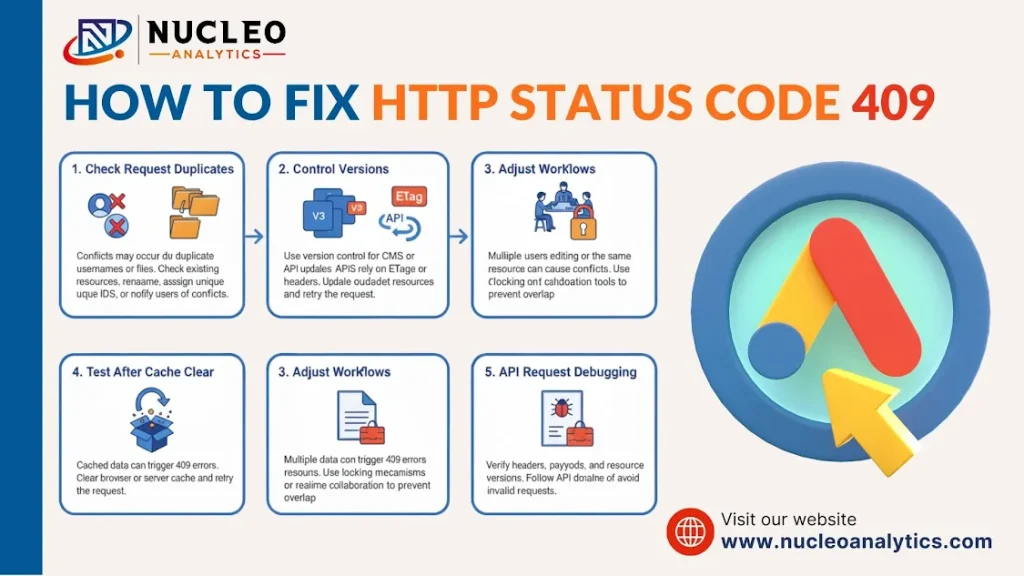
The 409 fix isn’t always easy. That depends on the cause. A breakdown:
1. Check Request Duplicates: If the problem is due to duplicate usernames or files, examine what already exists. Rename the resource, give it a unique identification, or notify users of the dispute.
2. Control Versions: For CMS or API updates, version control prevents disputes. APIs often utilize ETags or version headers to ensure updates. Update the resource and try again if your version is outdated.
3. Adjust Workflows: Some 409 errors are process issues. If your team frequently changes the same resource, use locking mechanisms or real-time collaboration technologies to avoid conflicts.
4. Test After Cache Clear: Cache data sometimes causes 409 problems. Retrying after clearing the browser or server caches fixes the issue.
5. API Request Debugging: Developers utilizing APIs should check resource versions and follow API documentation. Conflicts can result from invalid headers or payloads.
If You’re Struggling with Website Conflicts, Page Errors, or SEO Challenges, Nucleo Analytics Can Help You Get Everything Running Smoothly
SEO Implications of HTTP 409
If you’re managing SEO for a website, 409 errors can have subtle consequences. Googlebot treats 4xx errors differently depending on the context. While a single 409 on a user action like form submission won’t tank your rankings, repeated conflicts can:
- Interrupt crawling and indexing if bots repeatedly hit conflicting pages.
- Cause duplicate content issues if conflicting updates leave old and new versions accessible.
- Impact user experience, indirectly affecting bounce rates and SEO performance.
That’s why SEO agencies often recommend monitoring server logs and CMS activity to identify and fix 409 errors early.
How SEO Agencies Handle HTTP 409
A professional SEO agency doesn’t just focus on keywords. They also look at technical health, which includes error monitoring. Here’s what a typical workflow might include:
- Log Analysis: Track where 409 errors occur and what triggers them.
- CMS Review: Check for conflicting updates, duplicate pages, or automation issues.
- API Checks: Ensure integrations don’t generate conflicts during data updates.
- User Testing: Simulate common user actions to see if conflicts appear.
- Resolution: Implement fixes, from version control to duplicate prevention.
By keeping technical errors under control, an Local SEO agency ensures your website performs well both for humans and search engines.
Tools to Identify HTTP 409 Conflicts
There are a lot of tools that can help you find problems before they get worse:
- Server Logs: The best technique to find out which requests caused 409s.
- CMS Audit Plugins: WordPress and Drupal, for example, include plugins that may keep track of edits that are in disagreement.
- API Monitoring Tools: You can use Postman, Insomnia, and automated API testing systems to find version discrepancies.
- SEO Crawlers: Tools like Screaming Frog or Sitebulb may mark pages with 4xx issues, such as 409 conflicts.
Checking these on a regular basis will save you trouble later.
Preventing HTTP 409 Errors
Prevention is always better than a cure. Here are a few practical strategies:
- Educate Teams: Make sure content editors understand how conflicts occur.
- Implement Locking or Versioning: CMS tools with built-in versioning reduce conflicts.
- Use Unique Identifiers: For accounts, files, or database entries, unique IDs prevent accidental duplicates.
- Test API Requests: Always use the latest resource version to avoid conflicts.
- Monitor Regularly: Regular log checks catch small issues before they become bigger problems.
Final Thoughts
HTTP Status Code 409 may seem minor, but it affects site developers, content teams, and SEO agencies. Conflicts can impede processes, upset users, and damage searches. It can happen when two people update the same file at once, an API version is inaccurate, or a file is a copy.
The important point? Learn about conflict causes, address the underlying issue, and set up measures to prevent them. If you hire Nucleo Analytics, your website will run properly for users and search engines.