







Best CRM Tools for Businesses
Many businesses lose deals not because the product or service is lacking, but because follow-ups get missed.
At first, it may not seem like a big issue. Then leads start piling up, warm prospects go cold, and no one is quite sure who was supposed to follow up. The sales pipeline becomes harder to track, and simple spreadsheets stop being enough to manage growth effectively.
This is exactly what CRM systems tools were built for. The global CRM market is on track to hit $163 billion by 2030, growing at 14.6% a year. That’s not hype money. That’s businesses realizing that managing customer relationships manually simply doesn’t scale.
This guide breaks down the best CRM tools available in 2026, what they’re actually good at, who they make sense for, and where they fall short.
What Does a CRM Actually Do?
This sounds basic, but it’s worth asking because a lot of teams end up buying a CRM that does too much, or too little, for where they actually are.
At a minimum, a good CRM should:
- Keep all your customer data in one place (not six different tools)
- Track deals and conversations without relying on someone to manually update things
- Automate the repetitive stuff — follow-ups, task reminders, status changes.
- Connect with whatever marketing or email tools you’re already using.
- Give you reports that actually help you make decisions.
If a tool does most of these things and your team will realistically open it every day, that’s your CRM.
The Best CRM Tools for 2026 — At a Glance
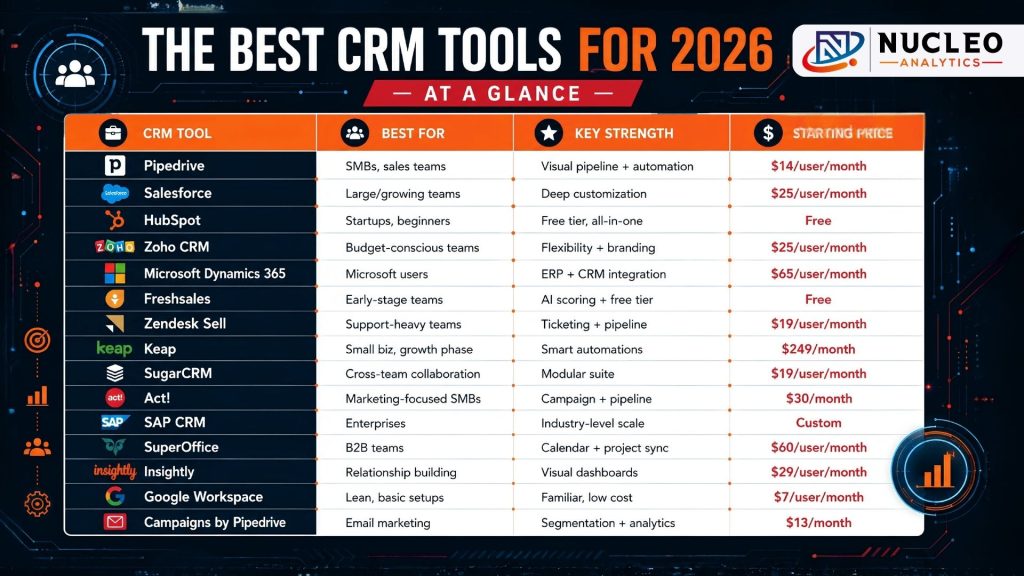
| CRM Tool | Best For | Key Strength | Starting Price |
| Pipedrive | SMBs, sales teams | Visual pipeline + automation | $14/user/month |
| Salesforce | Large/growing teams | Deep customization | $25/user/month |
| HubSpot | Startups, beginners | Free tier, all-in-one | Free |
| Zoho CRM | Budget-conscious teams | Flexibility + branding | $25/user/month |
| Microsoft Dynamics 365 | Microsoft users | ERP + CRM integration | $65/user/month |
| Freshsales | Early-stage teams | AI scoring + free tier | Free |
| Zendesk Sell | Support-heavy teams | Ticketing + pipeline | $19/user/month |
| Keap | Small biz, growth phase | Smart automations | $249/month |
| SugarCRM | Cross-team collaboration | Modular suite | $19/user/month |
| Act! | Marketing-focused SMBs | Campaign + pipeline | $30/month |
| SAP CRM | Enterprises | Industry-level scale | Custom |
| SuperOffice | B2B teams | Calendar + project sync | $60/user/month |
| Insightly | Relationship building | Visual dashboards | $29/user/month |
| Google Workspace | Lean, basic setups | Familiar, low cost | $7/user/month |
| Campaigns by Pipedrive | Email marketing | Segmentation + analytics | $13/month |
1. Pipedrive — Best Overall for Sales-Led Teams
Pipedrive is the one we recommend most often for small and mid-sized sales teams, not because it’s the flashiest option, but because people actually use it.
The visual pipeline is the main reason. Every deal sits in a card; you can drag it across stages, and at a glance, you can tell exactly what needs attention today. There’s no hunting through tabs or reading a long report. It’s just clear.
The AI Sales Assistant is genuinely useful too, it flags idle deals, suggests next actions, and keeps things moving without someone having to chase the team for updates.
What works well:
- Kanban-style pipeline with drag-and-drop
- Built-in email with templates and tracking
- 400+ integrations, including Google, Slack, and WhatsApp
- Clean mobile app for both iOS and Android
Who it’s for: SMBs that want a CRM that doesn’t require a week of training.
Pricing: $14 – $99/user/month
2. Salesforce — Best for Teams That Need to Build Their Own Thing
Salesforce is powerful. That’s not in question. The real question is whether your team needs that level of power — because it comes with complexity.
For large sales orgs or companies with very specific workflows, Salesforce’s depth is a genuine advantage. You can build almost anything on top of it. But for a 10-person team that just wants to track deals? It’s probably overkill.
What works well:
- Sales Cloud, Marketing Cloud, Service Cloud — each strong in its own right
- Einstein AI for predictive forecasting and lead scoring
- Enormous integration and developer ecosystem
- Advanced analytics and custom reporting
Who it’s for: Growing companies that need a CRM that can be shaped around complex processes.
Pricing: $25 – $500/user/month
The Right CRM Saves Time, Improves Follow-Ups, and Helps Close More Deals
3. HubSpot — Best Place to Start (Especially If Budget Is Tight)
HubSpot’s free CRM is actually free — not a 14-day trial, not a limited demo. You get contact management, deal tracking, email templates, and a basic pipeline without putting in a credit card.
The catch is that as your needs grow, the paid tiers add up fast. But as a starting point? Hard to beat.
What works well:
- Genuinely usable free plan
- Marketing Hub, Sales Hub, and Service Hub as optional upgrades
- Live chat and lead capture tools included
- Simple, clean interface with a short learning curve
Who it’s for: Startups and small teams looking for their first real CRM without upfront cost.
Pricing: Free and paid plans available
4. Zoho CRM — Best Flexible Option Under $60
Zoho CRM does a lot, and it lets you customize most of it. The interface can be styled to match your brand, the automation rules are flexible, and Zia (their AI assistant) handles enough of the repetitive tasks that your team can focus on actual selling.
Multi-channel outreach is probably the biggest strength here — phone, email, live chat, and social all in one place.
What works well:
- AI assistant (Zia) for task automation and lead insights
- Multi-channel communication from a single dashboard
- Strong branding and UI customization
- Solid lifecycle management tools
Who it’s for: Teams that need flexibility without paying enterprise prices.
Pricing: $25 – $59/user/month
5. Microsoft Dynamics 365 — Best for Teams Already in the Microsoft World
If your team runs on Teams, Outlook, and Excel every day, Dynamics 365 fits in without friction. It’s not the most exciting CRM on this list, but the integration depth with the rest of Microsoft’s ecosystem is genuinely strong.
The LinkedIn Sales Navigator connection is worth calling out — for teams doing outbound prospecting, being able to pull social context directly into the CRM saves real time.
What works well:
- Deep integration with Microsoft 365 and Teams
- LinkedIn Sales Navigator connection for prospecting
- Power BI for reporting and dashboards
- ERP + CRM in a single ecosystem if needed
Who it’s for: Companies already running on Microsoft tools that want to avoid switching platforms.
Pricing: $65 – $150/user/month
6. Freshsales — Best Free CRM With AI Features
Freshsales is one of those tools that surprises people. Even on the free plan, you get predictive contact scoring — something most CRMs charge for. Web form capture, deal tracking, and email integration are all included without any cost.
It’s not the most advanced CRM on this list, but for a team just getting into automation, it’s a strong starting point.
What works well:
- Predictive Contact Scoring on the free tier
- Web form lead capture
- Email integration and deal management
- Option to upgrade to Freshsales Suite for sales + marketing
Who it’s for: Early-stage companies that want automation features without a monthly bill.
Pricing: Free — paid plans available
7. Zendesk Sell — Best for Teams Balancing Sales and Support
Zendesk Sell works well as a standalone sales CRM. But where it really earns its place is when paired with Zendesk’s support platform. If your team handles a high volume of customer tickets alongside closing deals, having both in one ecosystem cuts a lot of back-and-forth.
What works well:
- Real-time pipeline and sales forecasting
- Ticketing system for customer support
- Self-service Help Center tools
- Solid mobile app
Who it’s for: Teams where sales and customer support overlap heavily.
Pricing: $19 – $115/user/month
8. Keap — Best for Small Businesses in Growth Mode
Keap is built for small businesses that have outgrown their manual processes but aren’t ready for an enterprise CRM. Its automations are event-triggered — they fire based on what a contact actually does, not just a time schedule.
The $249/month starting price is higher than most on this list, but it covers a full team rather than per-seat pricing, which makes more sense at a certain scale.
What works well:
- Behavior-triggered automation (not just time-based)
- Smart contact organization by source
- Built-in appointment scheduling
- Simple interface for non-technical teams
Who it’s for: Small businesses that need to automate sales and follow-ups without hiring an ops person.
Pricing: From $249/month
9. SugarCRM — Best When Multiple Teams Share One Customer
SugarCRM splits into three modules — Sugar Market, Sugar Sell, and Sugar Serve — one for each team. The benefit is that everyone is looking at the same customer data, just filtered for their role. Marketing knows what sales are closing; support knows what marketing promised.
What works well:
- Modular design for marketing, sales, and support
- Shared customer lifecycle view across teams
- Email and calendar sync
- Workflow automation across departments
Who it’s for: Organizations where cross-team customer visibility actually matters.
Pricing: $19 – $135/user/month
10. Act! — Best CRM for Marketing-Heavy SMBs
Act! lands somewhere between a CRM and a marketing platform. The pipeline management is solid, but the real draw is the built-in campaign builder, landing page tools, and automated workflows — all without needing a separate marketing tool.
What works well:
- Personalized campaign creation
- Targeted landing pages built in
- Interactive dashboards for decision-making
- Sales Process Management module
Who it’s for: SMBs that want marketing automation and CRM in one package.
Pricing: From $30/month
CRM, Marketing Automation, and Why They Need Each Other
One thing that doesn’t get talked about enough: Marketing Automation ROI gets significantly better when your CRM is actually connected to your campaigns.
When the two systems talk to each other, you stop guessing which email sequence converted a lead and start seeing real attribution. At Nucleo Analytics, we regularly help clients trace revenue back to specific touchpoints — not because they changed their strategy, but because they finally connected their CRM to the rest of their stack.
A Digital Marketing Strategy that treats CRM as central, not as an afterthought, performs better, full stop. The data is there; it just needs to flow in the right direction.
Wrapping Up
The best CRM tools aren’t the ones with the longest feature list. They’re the ones that fit how your team actually works, give you clean data to make decisions from, and scale as you grow.
There’s no single right answer here, but there’s definitely a wrong one, and it’s sticking with a spreadsheet past the point where it’s costing you deals.At Nucleo Analytics, we help businesses build data systems that work, including helping teams choose, set up, and get real value out of their CRM. If you’re unsure where to start, that’s what we’re here for.
Stop Managing Leads in Spreadsheets and Start Building a System That Scales
Frequently Asked Questions
What Are the Best CRM Systems Tools for Small Businesses in 2026?
How Do Sales CRM Tools Actually Improve Team Performance?
Is Marketing Automation Really Worth It for Small Businesses?
Can AI Tools for SEO and Content Creation Work Alongside a CRM?
How Does Nucleo Analytics Recommend Approaching a Crm Setup for the First Time?
Related Posts
Top Social Media Tools for Marketers in 2025 (With Real Use Cases)
Social media has evolved way beyond “just posting stuff.” In 2025, it’s the front door to your brand. Audiences want more than pretty pictures and […]

How to Rank for Voice Search Queries Using Google SEO
Voice search has become the present-day scenario rather than being a futuristic concept. It is already influencing the method of information acquisition by people over […]

What is 307 Temporary Redirect and How to Fix It?
In the realm of web management, not all redirects are made equal. A 307 Redirect signals a “Route Diversion Ahead”. This tells the visitors and […]

Master Keyword Competition Analysis with This Simple Guide
In today’s fast-paced era of online marketing, mere posting of content does not suffice. You may possess phenomenal products or services, but unless your website […]

What Content Leaders Should Understand About Agentic AI Now?
Content marketing has always been a matter of strategy, creativity, and timing. But now, a new power is influencing how organizations create, distribute, and measure […]

10 Red Flags Clients Should Watch Out for in a Digital Marketing Agency
In the latest, fast-paced, virtual global environment, corporations mainly depend on being online to attract interactions, build trust, and boost income. But with so many […]