
nucleo analytics
nucleo analytics
  • home
  • Services
    • SEO
    • Social Media Marketing
    • Google Ads
    • Reputation Management
    • International SEO
    • Local SEO Service Agency
    • Custom Website Development
    • Mobile-Application-Development
  • Outsource
    • SEO Outsourcing Agency in India
    • SEO Consultant India
    • SEO Reseller Services
  • Testimonials
  • Case Studies
  • FAQ
  • Blog
Contact Us
company logo

Helping businesses grow through strategic Digital Marketing, Custom Website and Mobile App Development, AI, and Innovative technology solutions that deliver measurable, long term results.

Follow us :

FacebookInstagramPinterestlinkedinYoutube

Quick Links

  • Home
  • Services
  • Testimonials
  • Case Studies
  • FAQ
  • Blog
  • Contact Us

Services

  • SEO
  • Social Media Marketing
  • Google Ads Services
  • Reputation Management
  • International SEO
  • Local SEO Service Agency
  • Custom Website Development
  • Mobile Application Development

Policy

  • Terms of Service
  • Cancellation & Refund Policy
  • Support
  • Privacy Policy

Contact Info

  • 1688 Sector 82, JLPL Industrial Area, Sahibzada Ajit Singh Nagar, Punjab 140308, India
  • +91-959-209-7054
  • info@nucleoanalytics.com
©2026 Nucleo Analytics.All Rights Reserved.
Terms of usePrivacyRefunds & Returns

How Website Monitoring Prevents Downtime and Traffic Loss

If you’ve ever opened your site one random morning and it just… didn’t load, you know that awful stomach-dropping feeling. Downtime hits like a punch. Customers vanish. Traffic dips. Sales evaporate. And the worst part? You usually don’t notice until hours later, when the damage is already done.

How Website Monitoring Prevents Downtime and Traffic Loss

This is exactly why website monitoring matters so damn much. Not just for big companies with giant IT teams, but for literally any business that depends on online visibility, from a solo blogger to an SEO agency, an ecommerce store, or even a freelancer with a personal portfolio.

And yet, people treat website monitoring like some “extra” technical luxury.
No, it’s one of the most important guards your site has.

This guide walks through the real reasons website monitoring prevents downtime and traffic loss, how it works, what tools you should actually care about, and how to keep your site from quietly sabotaging itself behind the scenes.

Let’s break it down.

Why Website Monitoring is Not Optional Anymore

Downtime is more than “site down for a few minutes.”
It’s a chain reaction.

  • Lost visitors
  • Lost conversions
  • Dropped rankings
  • Google crawling errors
  • Bad user experience
  • Customer complaints (the kind that make you question your life choices)

People don’t wait. If your site is slow or down, they click away faster than you can say “please refresh.”

And honestly, the internet is harsh. A user may not come back after a bad experience, even if the issue was temporary.

This is where website monitoring steps in quietly, watching your site 24/7, catching problems before humans do.

What Exactly Is Website Monitoring?

Website monitoring is a system that continuously checks your website for:

  • Uptime (is it available?)
  • Performance (is it slow today?)
  • Server health
  • Broken pages
  • SSL issues
  • Redirect problems
  • Core Web Vitals
  • Script failures
  • Third-party app problems

Think of it like the “health tracker” for your website.
You get alerts the moment something breaks, slows, or looks suspicious.

Some businesses treat monitoring like insurance:
You hope you don’t need it, but when you do… you’re damn glad it’s there.

How Website Monitoring Helps Prevent Downtime

Let’s go deeper. Not surface-level fluff, but real stuff that affects your ranking and revenue.

1. You Get Immediate Alerts When Something Breaks

Simply: it is one of the largest causes of websites going down.
Until a customer complains, nobody knows that the site is down.

Monitoring tools request your site on a periodical basis, every few seconds or a few minutes.
When your server goes dead, your phone/email/Slack is full of notifications.

This alone can cut downtime from hours to minutes.

2. Monitoring Spots Slow Loading Before it Becomes a Crisis

A website doesn’t just collapse out of nowhere.
It often starts slowing down first.

  • Slow = warning sign
  • Slow = traffic drop
  • Slow = SEO decline

Most site owners don’t open their own website daily.
Monitoring does it for you and flags:

  • Slow hosting
  • Heavy scripts
  • Failing plugins
  • CDN delays
  • Page bloat
  • Traffic spikes your server can’t handle

Catching this early can save your rankings from tanking.

3. Monitoring Keeps Google Happy

Google doesn’t like unreliable websites.
It doesn’t like crawling broken links.
It doesn’t like pages timing out.

When Googlebot keeps hitting error pages, it reduces crawl frequency.
Fewer crawls → slower indexing → weaker ranking potential.

Website monitoring makes sure you know:

  • If Google is seeing errors
  • If your hosting is choking
  • If the response time is unstable
  • If indexing suddenly drops

For any SEO agency or marketing team, this is basically survival-level data.

4. You Avoid Revenue Loss from Peak-Hour Crashes

The worst downtime always happens at the worst moment:

  • A holiday sale
  • An ad campaign day
  • Viral traffic spike
  • Email blast
  • Product launch

Monitoring tools detect increased load and warn you before the server crashes like a toddler after too much sugar.

5. Monitoring Detects Security Issues Early

A hacked site isn’t always obvious.
Sometimes the homepage loads fine, but internal pages are corrupted or injected with junk scripts.

Good monitoring tools alert you when:

  • Files change unexpectedly
  • Malware is detected
  • SSL certificate issues appear
  • Weird scripts load
  • Suspicious redirects happen

These early warnings prevent full shutdowns later.

Practical Tools You Should Use

Here’s a simple list — not fancy, just what actually helps:

  • Uptime Robot – Basic uptime checking
  • Pingdom – Performance insights + real alerts
  • Google Search Console – Crawl issues
  • GTmetrix – Speed diagnostics
  • Cloudflare – Security + load optimization
  • StatusCake – Detailed uptime reports
  • New Relic – Deep server and app monitoring

Use any combination, depending on your budget and how much pain you’re willing to tolerate before fixing issues.

How Website Monitoring Protects SEO
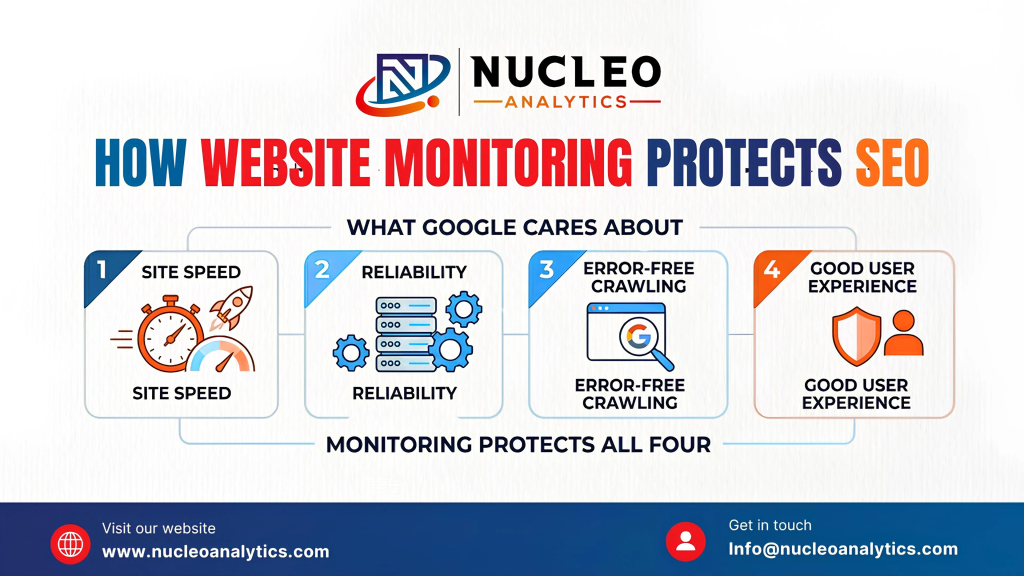
How Website Monitoring Protects SEO

Google cares about:

  • Site speed
  • Reliability
  • Error-free crawling
  • Good user experience

Monitoring protects all four.

When your site goes down repeatedly, Google assumes you’re unstable.
You drop in rankings behind competitors who simply stay online more consistently.

When your pages become slow or misconfigured, monitoring lets you fix problems before Google drops your Core Web Vitals.

If you’re a marketing team, SEO agency, or business owner trying to outrank competitors, website monitoring is basically armor.

If you don’t want to babysit your site 24/7, you can hand off the monitoring to experts. Nucleo Analytics offers tech-backed support, maintenance, and uptime safeguarding so you can stop stressing over breakdowns.

The Hidden Stuff Website Monitoring Catches

Monitoring isn’t only about downtime. It catches dozens of “silent killers”:

1. Broken API Connections

Website monitoring picks up broken API connections long before they turn into angry customer messages. Payment gateways can stop responding, shipping calculators may fail during checkout, or CRM/ERP integrations might quietly throw errors. None of these issues always breaks the entire website, but they absolutely break revenue. Monitoring detects these failures instantly, so you don’t lose sales without even realizing what went wrong.

2. Plugin/Theme Updates Gone Wrong

An update of a plugin or theme may seem to be an innocent thing, and one incompatible change can ruin your design, turn the buttons off, or cause entire pages to cease to load. This normally occurs during the most inappropriate moment when one is asleep or offline on their laptop. Tracking notifies you when a page becomes inactive or loads improperly, and then you can correct the error before users get into a mess.

3. DNS Issues

One such problem that does not manifest itself until the time your website is no longer available on the internet is your DNS problems. Even the tiniest error in DNS settings, a malfunctioning update of the nameserver, or slow propagation can put a site offline for hours. Monitoring will detect these DNS failures immediately and alert you, so you will not be left wondering why your site is not available or why traffic has stopped without any explanation to you.

4. SSL Certificate Expiring

The expiration of the SSL certificates is much more widespread than one may believe. A single renewal failure and your site displays a large warning that you are not a secure site, and immediately sends the user away. Keeping your eyes on your SSL and notifying you when the condition expires is a way of ensuring you do not lose traffic, trust, and even customers.

5. Hosting Problems

This is because sometimes it is not your site but your hosting company. Servers may slack, flood, or even momentarily fail, making your site laggy or/and unavailable. These hosting-side problems can be monitored by tracking response times and server behavior, and this way, you can know immediately whether it is your problem or theirs.

Building a Website Monitoring Strategy

By designing an adequate web monitoring system, you will not have to be some kind of technical guru sitting in front of the monitor all day. You only require a clean, sensible system that monitors your site, notifies you when something is broken, and provides you with sufficient information to make smart decisions. These are the steps to creating a strategy that works without making one a full-time IT geek.

Step 1: Uptime Monitoring (Basic Requirement) set up

Begin with the easiest and most basic one: uptime monitoring. Choose any good uptime monitor, enter your site address, and choose notification options: email, SMS, Slack, or anything else you have checked the quickest. It will ping your site on a regular basis and notify you in the event that it does not respond. This alone step can save you the hrs of undetected downtime.

Step 2: Performance Monitoring Addition

Problems with performance tend to be covert, and, thus, it is essential to keep your site tracked in terms of performance speed and loading. Monitoring such aspects as load time, bloated page components, oversized images, and scripts that could slow the performance. The majority of the tools will provide you with weekly/monthly reports; reviewing them will be a habit. Any minute delays can damage standings and transactions, and that is why they should be detected at an early stage rather than when a customer complains.

Step 3: Monitor Security & SSL

In security-related issues, you can be taken down just as fast as a server crash. Protection services like Cloudflare can be considered and used along with a malware scanner to have a keen eye on the suspicious activity. Increase pre-warnings on the expiry of the SSL and alteration of the same. A single failure during the renewal of theSSL can frighten away the visitors within seconds, and the safety of the watch can be left to the surveillance.

Step 4: Track Core Web Vitals

Core Web Vitals are not suggestions by Google only, but they directly affect the placement of your site and user experience. With the assistance of Google Search Console and PageSpeed Insights, keep track of such indicators as Largest Contentful Paint, Cumulative Layout Shift, and First Input Delay. The figures will leave you with the fact of how people feel about loading your site, and not how it feels to you.

Step 5: Review Logs Monthly

In order to read logs, you are not expected to be a professional. All one needs to do is find some time during the month to scan through status updates, error logs, performance trends, and security alerts. The main things you are looking after are abnormal spikes, frequent red flags, or theatrical performance declines. A big problem can be easily avoided, and the pattern can be noticed in the future.

Step 6: Find a Responsible Person

Surveillance is not effective when there is no one listening to the notices. Designate an individual, a member of your own team, or an outsourced service, whose role is to jump on problems when they occur. When you do not have the bandwidth, you can have other companies do the monitoring workflow, such as Nucleo Analytics, which can do the whole workflow, which will ensure that nothing is lost in the cracks.

How Monitoring Helps Large vs Small Sites

 Business Type Why Monitoring Matters
 Small business Every sale counts, downtime kills conversions
 SEO agency Client websites must stay healthy for rankings
 Ecommerce store Any cart error = instant revenue loss
 SaaS platforms Uptime directly affects customer churn
 Bloggers/content creators Traffic loss = ad & affiliate loss

Monitoring fits every scale.

What Happens If You Ignore Website Monitoring

Here’s the unfiltered version:

  • Your site will go down eventually
  • You won’t know it instantly
  • Users will bounce
  • SEO will suffer
  • Sales will slow
  • Google will see you as unreliable
  • Competitors will outrank you
  • Security risks will sneak in

Monitoring isn’t about paranoia.
It’s about being prepared.

Final Thoughts

If your website brings in even 1% of your revenue, customer leads, brand presence, or SEO value… then monitoring is not optional.
Downtime happens whether you watch your site or not.
The difference is whether you catch it in 2 minutes or 2 hours.

Investing in website monitoring is one of those behind-the-scenes decisions that quietly keeps your business stable, professional, and trustworthy.


Do you want to stop babysitting your site?

Table of Contents

  • Why Website Monitoring is Not Optional Anymore
  • What Exactly Is Website Monitoring?
  • How Website Monitoring Helps Prevent Downtime
  • Practical Tools You Should Use
  • How Website Monitoring Protects SEO
  • The Hidden Stuff Website Monitoring Catches
  • Building a Website Monitoring Strategy
  • How Monitoring Helps Large vs Small Sites
  • What Happens If You Ignore Website Monitoring

Recent Posts

_

Case Study: Building a High-Performance Backend with Go

Jul 16, 2026

_

Why Businesses Choose Go for Scalable Applications?

Jul 16, 2026

_

How Go Reduces Backend Costs for SaaS Companies

Jul 16, 2026

_

Why Developers Are Switching to Go in 2026

Jul 16, 2026

_

Digital Marketing Trends in 2026 Changing Business Growth

Jul 16, 2026

Need Help With Your Ads?

Our PPC experts analyze your campaigns and uncover hidden opportunities to boost ROI.

faq_background

Frequently Asked Questions

Find quick answers to the most common questions our clients ask about our services.

faq illustration
Related Posts
We’re proud to still be working with many of the same people that hired us in our early days.
Case Study: Building a High-Performance Backend with Go

Case Study: Building a High-Performance Backend with Go

Backend systems usually break long before companies realize something feels wrong.Everything looks stable from the outside. Traffic still arrives. Users still log in. Dashboards continue loading. Revenue numbers still m…

Read More
Why Businesses Choose Go for Scalable Applications?

Why Businesses Choose Go for Scalable Applications?

Scalability has become one of the biggest priorities in modern software development. Businesses are no longer building applications only for current traffic levels. Most companies now expect products to grow, sometimes…

Read More
How Go Reduces Backend Costs for SaaS Companies

How Go Reduces Backend Costs for SaaS Companies

Backend costs are one of those things that quietly grow in the background while SaaS teams focus on building features and shipping updates. Because early traffic is modest and infrastructure is still inexpensive, everyt…

Read More